The demo
See it run
The whole thing on a real survey file, in French: the file dropped in, the verdict and the priorities, then the Excel workbook opened sheet by sheet.
Run on every questionnaire in one pass, from duplicates to answers that contradict each other.
With a verdict: ready to publish, ready with reservations, or not usable as it stands.
One Excel file to send to the team as it is, without rewriting anything.
Your file is read on your own computer and never leaves it.
The use
What it does for a monitoring team
Nobody rereads hundreds of questionnaires one by one. Yet a survey report is only as good as the questionnaires behind it: one sent twice, one dated in the future, one filled in four minutes, and a figure that goes to a donor is wrong.
FieldReviewer does that rereading in one go. It is made for monitoring and evaluation officers, field supervisors and programme staff who have to answer for their figures, not for data analysts.
Using it asks for no analysis skills at all: no formula, no pivot table, no statistics, nothing to configure. You open the file, the tool tells you what is wrong in plain sentences, and hands you a workbook you can send to your team as it is. Knowing how to open an Excel file is enough.
You drop your file, it gives you a verdict, the three things to fix first, and a workbook ready to send.
The checks
Twelve checks, in one pass
Every questionnaire goes through the same twelve checks. Some of them need no setting at all: the tool works out what to expect from the file itself, such as which questions should have been shown, or which numbers cannot exceed which others.
Figure 1: what FieldReviewer looks for
The twelve checks, each with the question it answers, as the tool puts it to its users.
The verdict
What to fix first, and who should do it
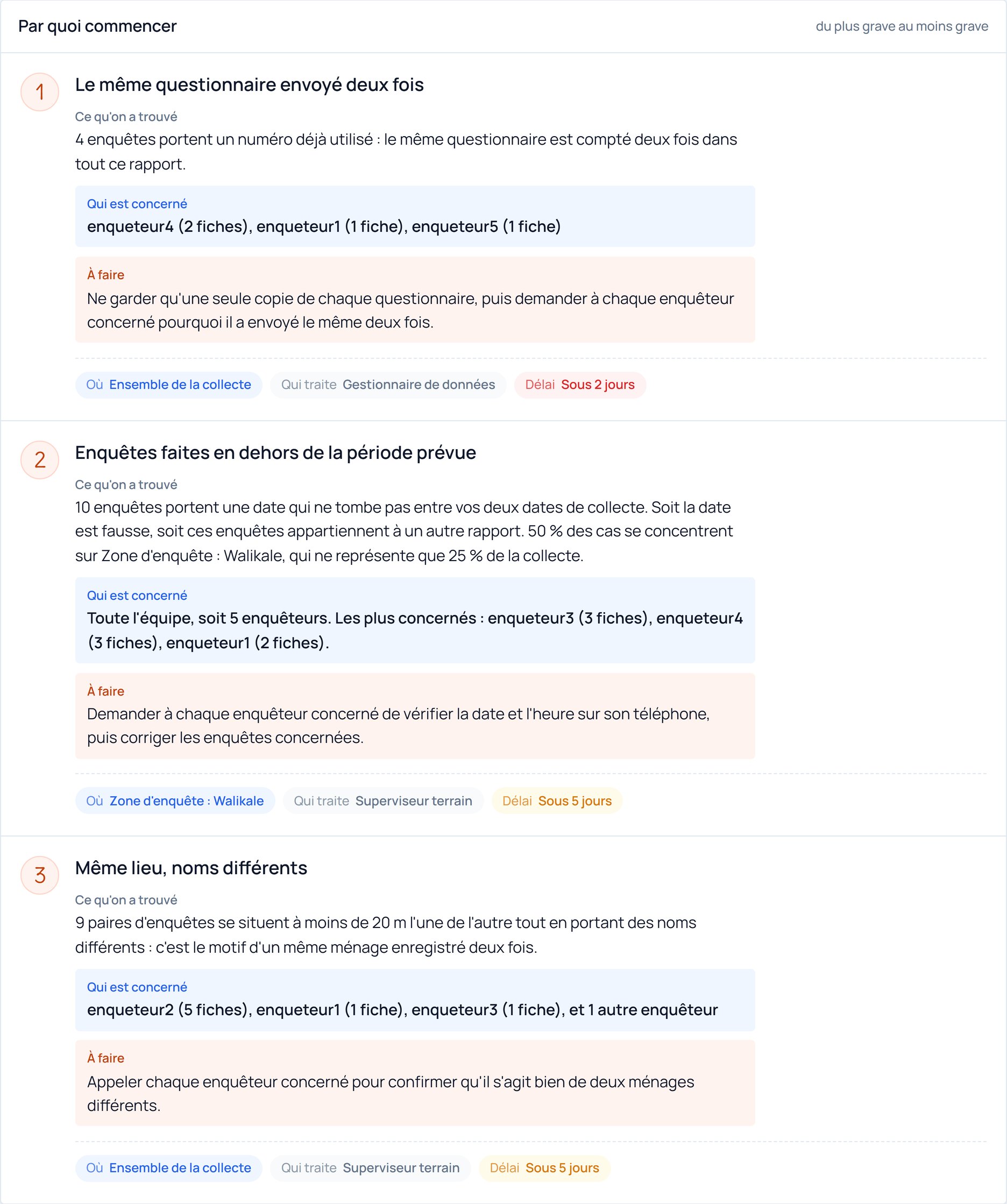
The result is not a list of hundreds of errors. It is a verdict, a score out of 100, and the three things to fix first, from the most serious to the least. Each one says what was found, where, what to do, who should do it and how soon.
That is the page a supervisor reads before a meeting: it turns a quality check into a work plan.
The team
Questions to ask, never accusations
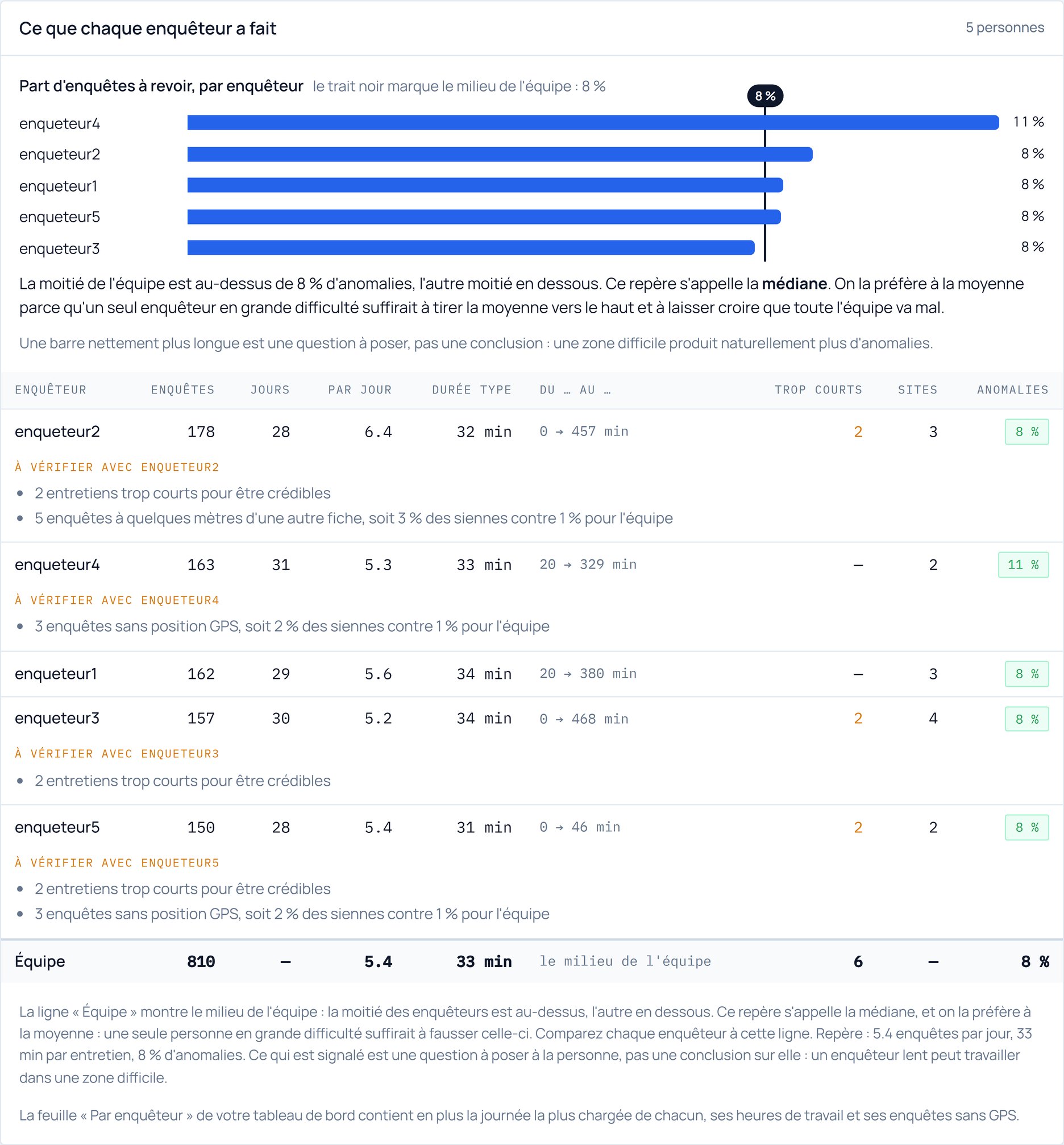
The tool also shows what each enumerator did in the field: how many surveys, over how many days, at what pace, and with what share of anomalies, next to the team median.
It is written with one rule: it never draws a conclusion about a person. A longer bar is a question to ask, not a verdict. An enumerator working in a difficult area naturally produces more anomalies, and the tool says so on the page.
The workbook
One Excel file, ready to send
Everything ends in one Excel workbook of nine sheets, with real charts: a dashboard to read first, the view by enumerator, by site and by day, the detail of every check, the original data with the status of each line, the list of anomalies for the field team to fill in, a data dictionary, and a log of every rule applied, for when someone asks how the data was checked.
The original data is never changed. The workbook adds columns and sheets around it, so the survey file stays exactly as it was collected.
Offline
Nothing to install, and your data stays with you
Survey data is often sensitive: names, locations, household situations. FieldReviewer opens with a double click, like a document, and there is nothing to install and no survey platform to connect: it reads the file you give it, not your account.
The first opening asks once for the email you bought with and a password you choose, to check the purchase. After that, no connection is ever needed, including in the field. Only if you ask it to can the tool check whether a newer version exists.
Your survey file itself is never sent anywhere, connected or not. You can test it: open the tool, cut the wifi, and run a full check. Everything still works.
Get it
FieldReviewer is available in the shop
It works with any survey file: KoboToolbox and KoboCollect, Google Forms, or any tool that produces an Excel or CSV export.
One payment, instant download, free updates for life. The shop page is in French.